RUN-CHICKEN
- 4.3
- Rating
- 10.00K
- Installs
- Free
- Price

 Analysis by App-foxy
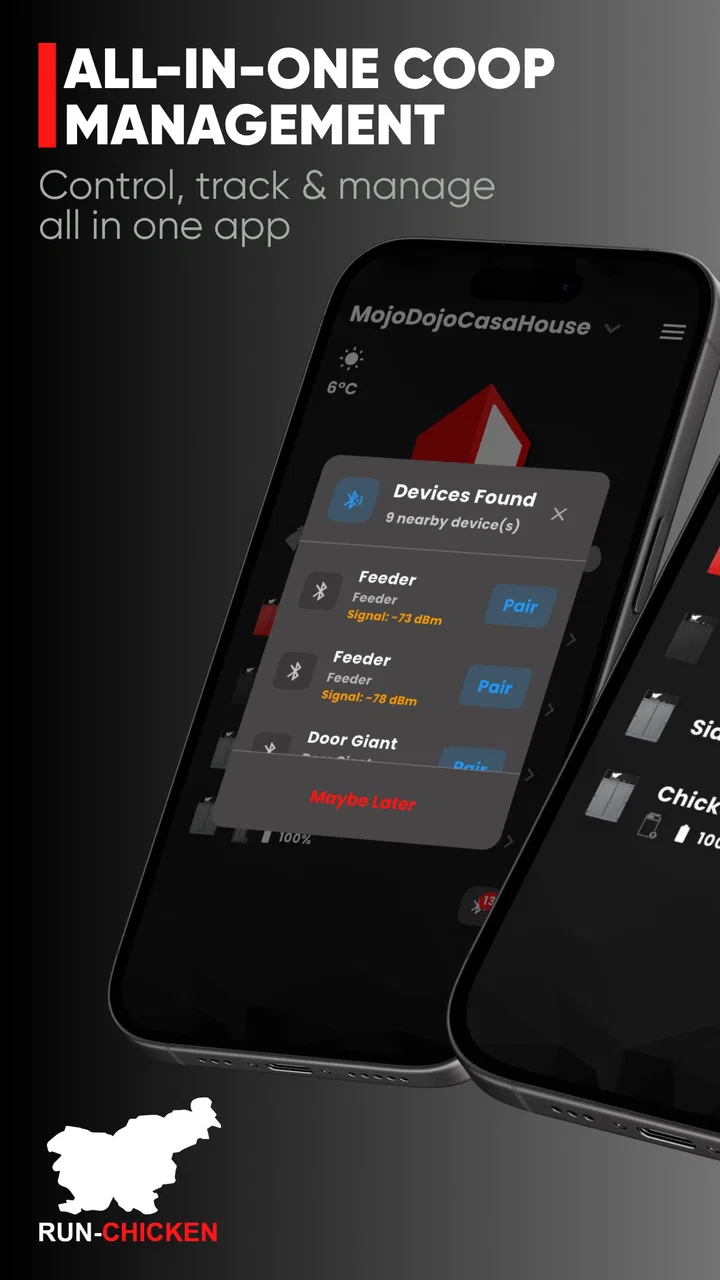
Opening and closing a chicken door by hand sounds like a small task, but it becomes surprisingly easy to forget when the weather is bad, daylight changes, or a busy morning starts before the birds are ready to leave. RUN-CHICKEN is a free House & Home app from RUN-TIGER LLC that gives owners a way to manage a compatible RUN-CHICKEN door from a phone rather than treating the door as a completely separate piece of equipment. I found its appeal strongest when I viewed it as a practical control tool, not as a novelty gadget.
The first impression is centered on convenience. The app is designed to optimize a RUN-CHICKEN door with more precise control and GPS synchronization, so the useful question is not whether it replaces every part of a poultry routine, but whether it makes the door easier to adjust and supervise. For someone already using the company’s door, that distinction matters. This is not a general smart-home controller for every automatic coop door; it is a companion app built around the RUN-CHICKEN system.
What feels useful after the first week
During the first week, I would expect the biggest benefit to come from having control close at hand. Instead of walking to the coop whenever I want to check or adjust the door, I can use the app as the operating point for the device. That is especially helpful during setup, seasonal changes, or those awkward days when the birds’ routine does not match my own.
You May Also Like

 Pandora - Music & Podcasts
Pandora’s Music Is Easy to Start, but Harder to Recover
Pandora’s strength is its low-effort path from a seed to a station. Its weak spot is how much confidence it asks you to place in connection, setup, and quiet recovery.

 AccuWeather: Weather Radar
AccuWeather Review: A Quick, Clear Forecast for Everyday Decisions
For everyday plans, the best forecast is the one you can understand quickly. AccuWeather makes rain timing, radar, and local conditions easy to act on, with a few trade-offs.

 Hill Climb Racing
Why Hill Climb Racing Still Turns Crashes Into One More Run
A tiny car, a bumpy hill and one more upgrade: Hill Climb Racing keeps resurfacing because its simple chaos makes every near-miss feel personal.

 AliExpress - Shopping App
AliExpress Makes Global Shopping Feel Personal, but Shoppers Bear the Risk
AliExpress turns a global marketplace into a pocket-sized discovery engine. Its reach is useful, its shopping loop compelling, and its trade-offs easy to miss.

 Lords Mobile: Kingdom Wars
Lords Mobile Is a Kingdom-Building Routine, Not a Quick Match
A case-by-case verdict on the building, battles, device demands, and social commitments that make Lords Mobile rewarding for some players and exhausting for others.

 PDF Scanner app - TapScanner
TapScanner Makes Paperwork Easier to Capture, Check, and Share
TapScanner makes scanning with a phone feel less like a rescue operation and more like a dependable step in getting work done. Its capture tools are useful, though not flawless.
More From Our News Desk
View All News


The GPS synchronization is one of the more meaningful ideas here. A door that follows daylight-related timing can otherwise become inconvenient as the year changes. Sunrise and sunset do not stay fixed, and a schedule that felt right a few weeks ago may gradually become too early or too late. GPS-based synchronization is intended to reduce that constant manual correction, making the door’s timing more closely connected to the local environment.
I would still treat that convenience as a starting point rather than a guarantee that every flock will behave perfectly. Chickens do not all follow the same rhythm, and a flock may have one bird that lingers outside after the others have gone in. The app can make timing adjustments easier, but it cannot replace checking whether the chosen routine suits the animals, the coop, and the surrounding risks.
A realistic everyday example is a winter morning when I leave home before the normal opening time. With the door managed through the phone, I can review the setup before leaving and avoid adding a trip to the coop to an already rushed routine. In the evening, the same arrangement can reduce the temptation to delay closing the coop simply because I am still cooking, commuting, or dealing with family plans. The value is not dramatic in one interaction; it comes from removing a repeated little obligation.
Another useful first-week habit is to make changes deliberately instead of changing several settings at once. If I alter the timing, I would observe the flock for a few days before making another adjustment. That approach makes it easier to tell whether a problem comes from the schedule, the door hardware, the birds’ behavior, or the phone connection. It also prevents the app from becoming a place where I repeatedly guess at settings without learning what actually works.
The app is rated at an average of 3.3 from around 279 ratings, with about 98 written reviews. I read that as a reason to keep expectations practical. The concept is clearly useful to some owners, but the experience may depend heavily on the particular RUN-CHICKEN door, the installation, the phone, and the user’s willingness to monitor the setup during the early days.
Who gets the quickest benefit
The strongest match is an owner who already has a RUN-CHICKEN door and wants more convenient control from a mobile device. It should also appeal to people who dislike making seasonal schedule changes by hand, or who want to manage the door while they are away from the coop. For a small backyard flock, that can make the daily routine feel more predictable without turning poultry care into a complicated smart-home project.
I would be more cautious if I were shopping for a complete automatic coop solution and had not chosen the hardware yet. The app’s usefulness is tied to the RUN-CHICKEN ecosystem, so it is not the right place to begin if I need one controller that works across several brands. In that situation, a broader smart-home platform or a door system with wider device compatibility may be a better fit, even if it offers less specialized control.
How it compares with ordinary alternatives
The simplest alternative is manual operation. A person can open and close the coop door at the start and end of each day, and that approach has one major advantage: it is easy to understand. There is no phone interface to learn and no app-based control to think about. Manual operation may be perfectly reasonable for someone who works from home, keeps a very consistent schedule, and enjoys checking the coop personally.
The trade-off is that manual routines depend on memory and availability. A missed evening can leave birds exposed, while an early departure can make morning opening inconvenient. RUN-CHICKEN adds value by moving the control point from the coop to the phone and by supporting GPS synchronization. That is a more focused solution than a generic timer because it is intended for this particular door system.
Compared with a fully integrated smart-home setup, this app is likely to feel narrower but more directly relevant to the door. I would not choose it because I want a dashboard for lights, cameras, feeders, and temperature sensors. I would choose it because I want the RUN-CHICKEN door to be easier to manage. That focused purpose is a strength for the right owner and a limitation for anyone expecting a complete poultry-management platform.
What remains valuable after the novelty fades
The first-week excitement of controlling a coop door from a phone naturally wears off. That is not a problem if the app continues to remove small points of friction. In my view, its long-term value depends on whether GPS synchronization and convenient control reduce enough daily effort to justify keeping the app installed and maintaining the connection to the door.
Month to month, the most useful role is seasonal adjustment. Daylight changes gradually, and owners often notice the problem only after the door begins opening at an inconvenient time or closing before the flock has settled. Having a dedicated control app makes those corrections less intimidating than adjusting an unfamiliar device directly. The practical benefit is not that I never need to think about the door; it is that the necessary thinking takes less time.
There is also value during unusual weeks. If I am traveling, working different hours, or relying on another person to look after the flock, the app can make the door’s routine easier to explain and manage. I would still make sure the person caring for the chickens understands the physical door and the animals’ needs, because phone control should not become a substitute for a backup plan. A dead phone, a poor connection, or a mechanical issue can turn a convenient system into a reason to check the coop more carefully.
One non-obvious advantage is that the app encourages me to separate timing problems from animal-care problems. If a chicken is outside late, I can first consider whether the closing schedule is appropriate, then inspect the coop and flock rather than assuming the app itself is at fault. That mindset is important with any automated door: automation handles repetition, but observation remains the owner’s responsibility.
Another useful approach is to use the app as a seasonal record in my own routine. I can note when I changed the timing and what the flock did afterward, even if that record is kept outside the app. Over time, this creates a personal reference for the coop. It is a simple habit, but it prevents me from making the same trial-and-error adjustments every year.
The app is free, which lowers the barrier to trying it for an existing RUN-CHICKEN owner. It was released on Nov 10, 2023, and the current version is 3.2.0. It supports Android 7.0 or later, so owners with older compatible phones may still be able to use it. The age rating is Everyone, which fits the app’s household-control purpose rather than an entertainment or social function.
The maintenance burden is more than installing the app
The app itself may be quick to install, but the complete system still needs attention. I would check the door’s physical movement, the power situation, the phone connection, and the timing behavior as part of a normal coop inspection. A mobile controller cannot correct a blocked track, a door that does not close cleanly, or a flock that has developed an unexpected routine.
This is where the app’s convenience can create a false sense of security. When a door is automated, it is tempting to assume that the routine is taking care of itself. I would keep a regular physical check in place, particularly after severe weather or whenever the coop has been cleaned, moved, or modified. The app can make operation easier, but it does not remove the need to care for the hardware.
I would also avoid treating GPS synchronization as a set-and-forget feature without observing the result. Local conditions around the coop can affect how the flock behaves even when the daylight-based timing is sensible. Trees, buildings, shade, predators, and the birds’ own habits may make a slightly different schedule safer or more practical. The best use of synchronization is as a reliable baseline that I can adjust when the real-world routine calls for it.
For a household with several people, agreeing on who is allowed to change the door settings is another worthwhile habit. Too many casual changes can make the routine unpredictable, especially if one person adjusts the timing without telling anyone else. A simple shared rule—change settings only when there is a clear reason and mention the change—can prevent confusion that no app interface can solve.
Where fatigue can set in
The main source of fatigue is the need to think about another app in an already busy household. If I only use the door occasionally, opening a dedicated controller may feel like extra effort compared with walking to the coop. The app earns its place when the repeated convenience is real, not when it is used merely because remote control sounds impressive.
There is also a learning curve around trust. During the first several cycles, I would want to confirm that the door behaves as expected before relying on it during a trip or a particularly busy day. That monitoring period may feel tedious, but it is sensible. Automation becomes useful only after I understand how the system behaves in my own coop.
Users who expect a rich dashboard may find the focused design limiting. The store summary emphasizes precise control and GPS synchronization, not flock records, feeding plans, health tracking, or a broad collection of connected devices. For those tasks, a separate poultry-management tool or a general smart-home system may be more suitable. Adding unrelated expectations would make this app seem weaker than it needs to be; its job is narrower.
Owners should also think about dependence on a phone. If the primary user changes phones, shares care duties, or frequently has low battery, the household needs a practical fallback. I would keep the physical door accessible and make sure another responsible person knows the normal routine. That is not a criticism unique to this app; it is a basic trade-off whenever a manual task becomes phone-controlled.
Who should skip it
I would skip RUN-CHICKEN if I do not own a compatible RUN-CHICKEN door, because the app’s specialized purpose would not justify taking up space on my phone. I would also skip it if I prefer a completely manual coop routine and already have no trouble opening and closing the door consistently. In that case, the phone adds an extra layer rather than solving a real problem.
I would look elsewhere if my priority were one app for an entire property. Someone managing cameras, irrigation, lighting, environmental sensors, and multiple brands of equipment may be better served by a broader platform. That choice could involve compromises in poultry-specific control, but the wider system may be easier to live with when the household already relies on one central automation hub.
Finally, I would not choose it as a replacement for regular animal observation. If the goal is to stop visiting the coop altogether, no door-control app is the right answer. Chickens still need food, water, shelter checks, and attention to changes in behavior. The app is most convincing when it frees time for those responsibilities rather than pretending they are unnecessary.
My long-term verdict
After the novelty fades, I think RUN-CHICKEN can earn lasting space on the phone of the right owner. Its lasting value comes from repeated, modest improvements: easier door control, less dependence on a fixed personal schedule, and GPS synchronization that can reduce seasonal fiddling. Those benefits are practical rather than flashy, which is exactly why they can remain useful over time.
My recommendation is strongest for people who already use a RUN-CHICKEN door and regularly struggle with early mornings, late evenings, travel, or changing daylight. I would install it, test the routine carefully, and keep a physical inspection habit. The app is free, comes from RUN-TIGER LLC, and has reached over 10 thousand installs, but those figures matter less to me than whether it removes a recurring chore in a particular household.
The best reason to keep this app is dependable routine, not remote-control novelty. If it helps the door match the flock and the owner’s schedule without demanding constant attention, it becomes a useful part of coop maintenance. If manual operation is already effortless, or if a wider smart-home platform is more important, the specialized approach may feel unnecessary.
My final view is positive but deliberately specific: RUN-CHICKEN is a sensible companion for its own door system, not a universal answer to every poultry or home-automation need. I would recommend it to a friend who wants fewer timing chores and is willing to keep an eye on the hardware. For that person, the app’s value should survive the first week because it supports a habit that repeats every day.
FAQs for RUN-CHICKEN
01What is the main objective of RUN-CHICKEN?
RUN-CHICKEN is an endless runner game where players control a chicken sprinting through various landscapes. The aim is to dodge obstacles, collect power-ups, and achieve the highest score possible. Its engaging gameplay and vibrant graphics make it a fun and addictive experience for players of all ages.
02Is RUN-CHICKEN suitable for children?
Yes, RUN-CHICKEN is family-friendly and suitable for children. The game features colorful graphics, simple controls, and non-violent content, making it appropriate for younger audiences. Parents can also appreciate the game’s focus on reflex development and hand-eye coordination in a safe gaming environment.
03Does RUN-CHICKEN require an internet connection to play?
RUN-CHICKEN can be played offline, making it perfect for gaming on the go. However, some features, such as leaderboards and in-game purchases, may require an internet connection. Regardless, the core gameplay remains fully accessible without connectivity, ensuring uninterrupted fun.
04Are there in-app purchases in RUN-CHICKEN?
Yes, RUN-CHICKEN offers in-app purchases that allow players to buy power-ups, new skins, and other enhancements. These purchases are optional and designed to enhance the gaming experience. Players can still enjoy the game fully without spending money, but the additional items can provide a boost.
05How often are new updates or features added to RUN-CHICKEN?
The developers of RUN-CHICKEN frequently release updates to fix bugs and enhance the game’s features. These updates may include new levels, characters, and seasonal events to keep the gameplay fresh and exciting. Players can enable notifications to stay informed about the latest additions.
Pros
- Intuitive user interface design.
- Engaging gameplay mechanics.
- Frequent updates with new levels.
- Minimal ads for a free app.
- Smooth performance on older devices.
Cons
- Limited character customization options.
- In-app purchases can be pricey.
- Requires constant internet connection.
- Occasional lag on high graphics settings.
- No multiplayer mode available.

RUN-CHICKEN
Gallery